by
by Paytm FASTag, a popular electronic toll collection system, will cease to function after February 29. Users who have already purchased Paytm FASTag must switch to an alternative payment method or use a new FASTag provided by a different service provider.
FASTag is a technology that allows road users to pay toll charges without stopping their vehicles at toll plazas. It is attached to vehicles’ windshields and automatically deducts toll charges from the prepaid account linked to it. Paytm FASTag has been widely used across India due to its convenience and ease of use.
However, recent news indicates that Paytm FASTag will no longer work after February 29. This means that users will not be able to use their existing Paytm FASTag to make toll payments at toll plazas after this date.
Users affected by this discontinuation have several options. They can either switch to a new FASTag provided by a different service provider or consider using other payment methods such as cash, cards, or mobile apps. The new FASTag phone pay option may also be available for FASTag users.
It is essential for FASTag users to take appropriate actions to ensure uninterrupted toll payment services. By switching to a new FASTag or using a different payment method, they can continue to enjoy the convenience of electronic toll collection.
How to Get Fast Tag on Phonepe
Phonepe is a popular mobile payment app that allows users to make payments using their smartphones. It offers various features such as fast tag integration, which allows users to make payments at NFC-enabled terminals just by scanning the fast tag. This document explains how to get fast tag on Phonepe .
Prerequisites
Before you start, make sure the following requirements are met:
1. Phonepe App: You must have the Phone Pay app installed on your smartphone.
2. NFC Support: Your phone should have NFC (Near Field Communication) technology built-in.
3. Internet Connection: Make sure you have a stable internet connection.
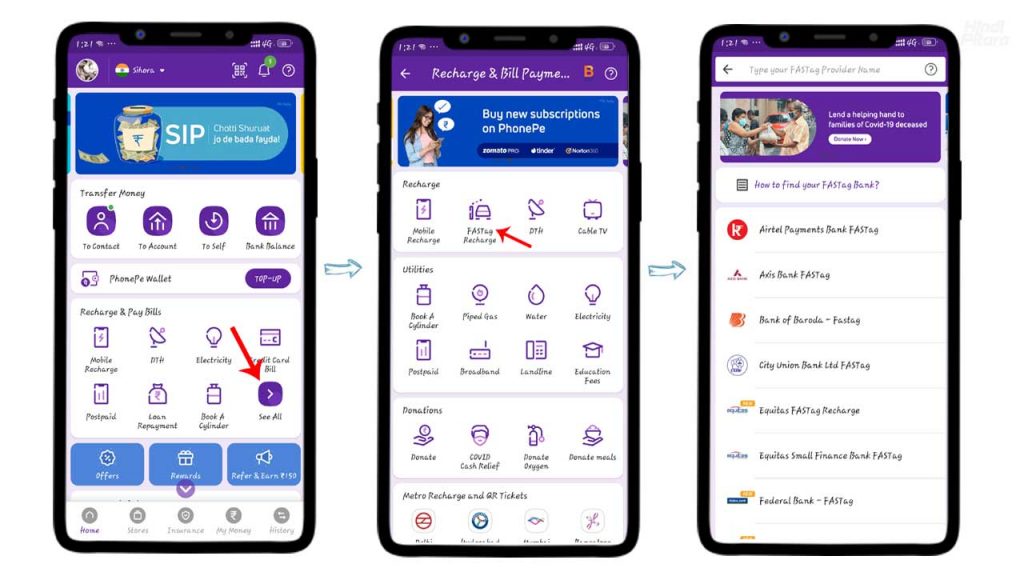
Step-by-Step Guide
1. Open the Phonepe app on your smartphone.
2. Tap on the “Fast Tag” option at the bottom of the screen.
3. Tap on the “+” icon to add a new fast tag.
4. Hold your smartphone close to the fast tag to scan it.
5. After a few seconds, the fast tag will be successfully added to the Phonepe app.
6. You can now make payments by simply tapping on the fast tag at NFC-enabled terminals.
Download phonepe Application
ANDROID
IOS